Live glass-morphism wallpaper with interactive home UI
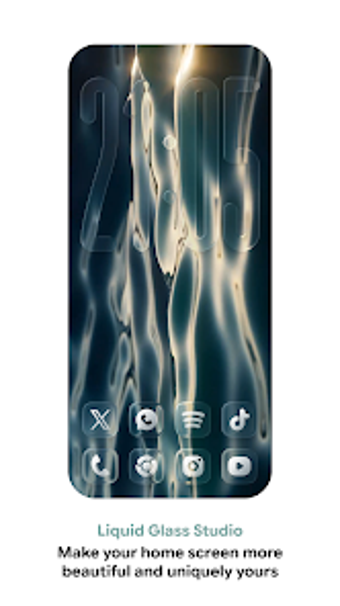
Liquid Glass Studio from NARIK DESIGN transforms Android home screens into an interactive glass-morphism workspace for personalization enthusiasts. The app renders a live 3D glass engine that applies refraction, blur, and sensor-driven parallax to widgets, app containers, and a dock. It bundles a native widget suite and supports custom video or image wallpapers while adapting grid layouts for phones, tablets, and foldables. This targets users who want a cohesive, depth-driven home environment without adding extra widget tools.
What the app replaces on a standard home screen
Liquid Glass Studio replaces static wallpapers and separate icon packs with a single live wallpaper environment that hosts interactive elements. The app's real-time 3D liquid glass rendering engine produces refractive and blurred glass panels, and the live wallpaper approach lets those panels host apps, folders, a dock, and native widgets. The live implementation is designed to work alongside existing launchers because the wallpaper supplies the interactive surface.
How much control the workspace offers
The app exposes granular styling for glass elements, letting users pick from light, dark, and tinted glass styles plus adjustable parallax and sensor-based lighting. Built-in widgets cover weather, calendar, battery, music, and search, and containers let you arrange apps and folders inside the glass layers. Custom video wallpapers and user images can be applied to the scene, and adaptive grid options tune layouts for different device shapes.
What to expect from performance and rendering
Rendering runs in real time, so the visual effects depend on device graphics capabilities and the chosen content. The engine uses live refraction and blur and supports custom video wallpapers, which implies higher GPU activity for animated or high-resolution backgrounds. Advanced rendering features are noted as optimized for recent platform capabilities, so users on older or entry-level hardware may see greater battery or responsiveness impact compared with static wallpapers.
How easy it is to set up and how widely it works
Setup is straightforward because the app installs as a live wallpaper, avoiding launcher replacement. Elements are placed through the wallpaper interface rather than separate widget plugins; the developer explicitly states the widgets are native, so no third-party widget apps are required. Adaptive grids and explicit support for phones, tablets, and foldables mean the layout adjusts to different screen types without manual grid hacks.
Who should install Liquid Glass Studio
Liquid Glass Studio is a capable choice for Android customization enthusiasts who accept continuous graphical rendering in exchange for a unified, depth-driven home environment. The developer has been active since 2022, which supports continued maintenance and updates. Users on older devices or those who prioritise minimal background processing should evaluate compatibility first, and those who prefer simple icon swaps may find the live-rendered approach heavier than lightweight personalization tools.